© Devoteam Revolve
This blog post is based on my talk at the Community Day Dach in Munich. In my daily work, I often run into a frustrating problem. When I need to debug or understand how an application works, I naturally go to CloudWatch. However, the different parts of a project are often segregated into different AWS accounts. So, I go back to the SSO portal and access this new account.
But very frequently I need to go back to the first account, which is still open in a tab of my browser, but, oh no, I have been disconnected from the account… Annoying, isn’t it?
Now that we’ve discussed the problem, let’s see how we can access all our log data without being disconnected.
The Solution: CloudWatch OAM
While third-party solutions like Datadog and Dynatrace exist, they come with costs and require leaving the AWS environment. I will introduce you to a relatively unknown and underutilized AWS feature: CloudWatch Observability Access Manager (OAM).
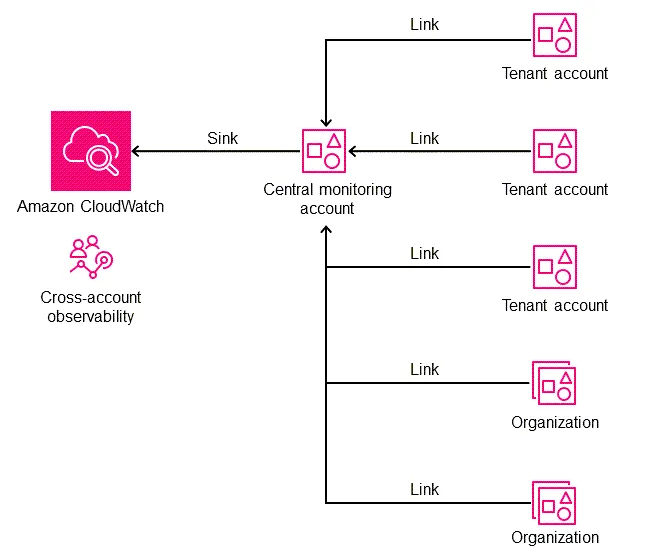
Before we begin, I’d like to review **the basics of **observability, the three pillars of which are:
- Metrics: These numerical data points tell you how your systems and applications perform. Examples include CPU utilisation, memory usage, and request latency.
- Logs: These are records of events in your systems and applications. They provide detailed information about what happened, when it happened, and where it happened.
- Traces: These track the flow of requests through your applications, helping you understand how different components interact and identify performance bottlenecks.
These three pillars are valid for all applications and infrastructures, not just on AWS. However, in addition to these three pillars, we find two other types of data that CloudWatch OAM can manage:
- Application Insights: This provides in-depth monitoring for your applications, collecting data like request rates, error rates, and response times.
- Internet Monitor: This monitors the availability and performance of your applications from the perspective of your end users, giving you insights into how they experience your services.
Seeing this article as an excellent opportunity to introduce you to another deployment method simultaneously, I will introduce you to HCP Terraform, the version of Terraform managed by HashiCorp with lots of little extras that don’t exist in the community version. You could compare it to what AWS is to on-premises infrastructure.
Why HCP Terraform?
HCP Terraform is a managed Terraform offering by HashiCorp. Think of it as the AWS of the Terraform world. It provides several advantages over the community version, such as:
- Managed infrastructure: No need to manage your own Terraform infrastructure. HCP takes care of that for you.
- Enhanced collaboration: Improved collaboration features make it easier for teams to work together.
- Integration with other HashiCorp tools: Seamless integration with Vault, Consul, and Nomad, expanding your infrastructure management capabilities.
Understanding the Implementation
Before we start the implementation, I’ll explain the complete setup to help you understand why we’re doing it this way.
We’re going to create a Terraform stack that will be used to deploy our AWS organisation. We could do this with AWS Account Factory for Terraform (AFT) or Control Tower, but these methods each have their own advantages and disadvantages. So, we will manually create our first project for our master account, which will be connected to a stack hosted on a GitHub repo. This Terraform stack will deploy (meaning create) our HCP Terraform projects on HCP and create our AWS accounts, each of which will be linked to its own HCP project. We could create a single HCP project, but with an actual enterprise organisation that can contain 100 or even 1000 AWS accounts, the Terraform stack would quickly become unmanageable. However, if we have one HCP project per account, we’ll only have a single Terraform codebase that will be hosted on a repo. Here’s a diagram:
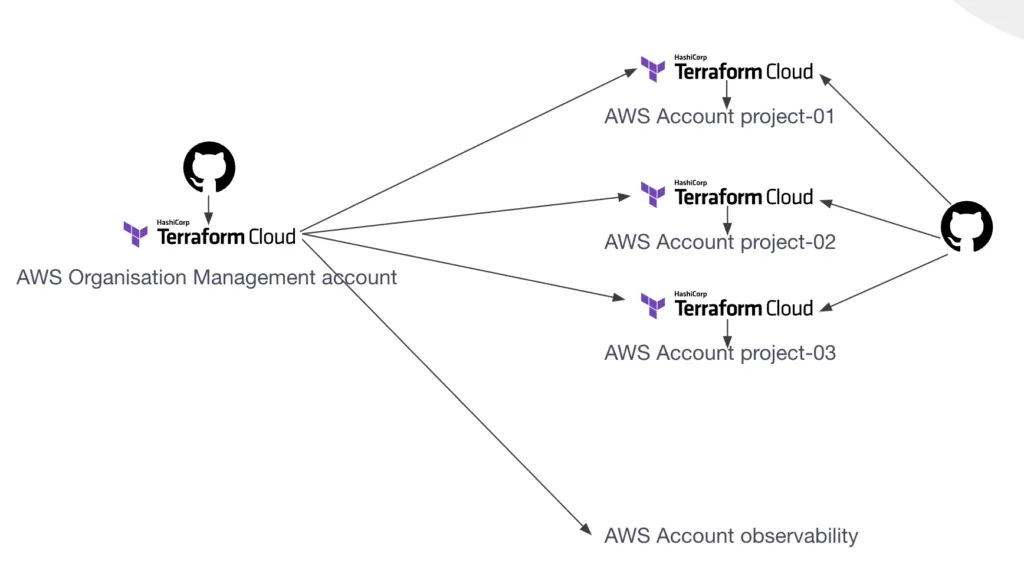
As you can see, the organisation stack will also create the observability account, but it won’t have its own HCP project. The account will be managed directly by the organisation stack.
Before we continue, let’s look at how….
_Find the next part of this article on my company’s blog (free): _https://rebirth.devoteam.com/2024/10/10/centralised-logging-cloudwatch-oam/